Smart Translate: Real-Time Web Translation
Overview
The Smart Translate browser extension is designed to enhance the web browsing experience for users encountering content in foreign languages. By automatically detecting the language of web pages, it delivers real-time translations into a user-defined target language, eliminating language barriers during online research, news reading, or e-commerce activities. The tool is particularly beneficial for professionals, students, and casual internet users who frequently access multilingual content.
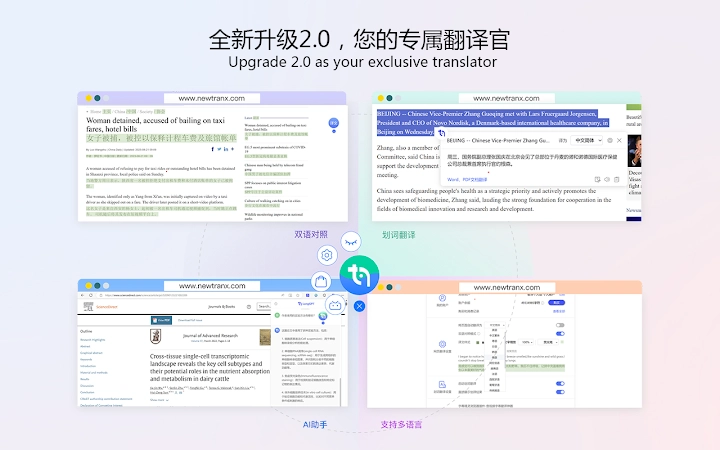
It supports translation between Chinese and over a dozen global languages, including major European languages such as English, Russian, German, French, and Spanish; Asian languages like Japanese, Korean, Vietnamese, Arabic, and Cantonese; and several ethnic minority languages such as Uyghur, Tibetan, Mongolian, and Zhuang. This broad language coverage makes it a versatile utility for international communication and information access.
Real-world applications include translating academic articles, understanding product descriptions during online shopping, or reading international news without relying on external tools. The extension operates seamlessly within the browser environment, requiring minimal user intervention. Its core function is to streamline cross-language communication directly within the browsing session, improving efficiency and accessibility for non-native speakers.
Key Features & Capabilities
- Automatic Language Detection – The extension identifies the language of a web page upon loading and initiates translation without manual input, ensuring a smooth browsing experience.
- Real-Time Translation – Content is translated instantly as the page loads, allowing users to read foreign-language websites in their preferred language.
- Customizable Target Language – Users can set their preferred translation language through the settings panel, enabling consistent output across sessions.
- Manual Translation Trigger – A visible “Translate” button in the corner of the screen allows users to initiate translation on demand, providing control over when and how content is translated.
- Highlight-and-Translate Functionality – When enabled, users can select specific words or phrases on a webpage, triggering an immediate translation of the highlighted text.
- Toggle Translation Mode – The option to disable automatic translation ensures users can browse original content when needed, with manual translation available upon request.
These features support a range of workflows. For instance, a student researching international studies can automatically translate foreign news articles while preserving the ability to manually translate key terms. A traveler reading a foreign-language website can highlight specific phrases to understand pricing or directions. The extension integrates directly into the browser, minimizing context switching and maintaining focus on the task at hand.
User Interface, Workflow & Performance
The Smart Translate extension features a minimalistic user interface, with a small “译” button positioned in the lower-right corner of the browser window. This design ensures visibility without obstructing the browsing experience. Navigation is straightforward, with all settings accessible through a dedicated configuration panel within the browser’s extension menu.
Workflow efficiency is high, as the extension operates with minimal user input. Once configured, automatic translation begins immediately upon page load. Manual translation is initiated with a single click, and the highlight-and-translate function responds quickly to user selections. The interface remains unobtrusive, allowing users to focus on content rather than tool interaction.
Performance details were not specified by the developer. However, based on the extension’s size of 1.2 MB and its lightweight nature, it is expected to consume minimal system resources. The developer did not provide additional system requirements or performance benchmarks. General software behavior suggests stable operation under normal browsing conditions, though actual performance may vary depending on network speed and page complexity.
Compatibility & System Requirements
Smart Translate is compatible with Windows, Mac, and Linux operating systems. It is designed for use with the Google Chrome browser, as indicated by its category and distribution method. The software version is 1.0.0, with an installation size of 1.2 MB, making it a lightweight addition to any system.
Exact system requirements were not listed. Compatibility information is limited to the supported platforms and browser environment. The developer did not specify CPU, RAM, or storage thresholds. Users should ensure their system meets the baseline requirements of the Chrome browser to run the extension effectively.
Pros and Cons
Pros
- Supports over a dozen languages, including major global and ethnic minority languages
- Automatic language detection reduces manual effort during browsing
- Lightweight design with minimal resource usage
- Intuitive interface with easy-to-access controls
- Free to use with no hidden costs
- Offers both automatic and manual translation modes for flexibility
Cons
- Exact performance data and system requirements were not provided
- Limited to Google Chrome browser, restricting cross-browser use
- Translation quality depends on underlying engine, which is not specified
- No offline translation capability mentioned
FAQ Section
Is Smart Translate compatible with browsers other than Chrome?
Based on current information, the extension is designed for Google Chrome. Compatibility with other browsers has not been confirmed.
Is the extension safe to use?
Smart Translate is a lightweight browser extension with no reported security issues. It operates within the browser’s sandboxed environment, minimizing risks to system integrity.
How often does the extension update?
The developer has not disclosed an update schedule. Users are advised to check the extension’s page regularly for new versions.
What type of license does Smart Translate use?
The software is available at no cost and is distributed as a free tool. No formal license details were provided.
Can I use Smart Translate without an internet connection?
Since translation requires external processing, offline functionality is not supported. A stable internet connection is required for real-time translation.
Final Thoughts + CTA
Smart Translate delivers a practical solution for users navigating multilingual web content. Its ability to automatically detect and translate pages, combined with customizable settings and support for diverse languages, makes it a valuable tool for students, researchers, and global consumers. While system performance details are limited, the extension’s lightweight footprint and intuitive design contribute to a smooth user experience.
For anyone seeking a fast, secure, and easy-to-use translation tool that integrates directly into their browser, Smart Translate stands out as a compelling choice. It eliminates the need for third-party translation services and streamlines access to international information.
Download Smart Translate now


